There were only few instances where I needed to do packet captures and analyze it using Wireshark. The first time I've used a network protocol analyzer was when troubleshooting for a slow application (it was called Ethereal back then). The second was just recently where I needed to verify web authentication traffic with a vendor.
Wireshark is a very powerful tool and I only use it when necessary and as a last resort for troubleshooting. It's also a good way of proving that it's not an issue with the network. I've read and highly recommend a book about Wireshark called Practical Packet Analysis by Chris Sanders. Below is the Layer 2 switching security and Wireshark lab I did while studying for my CompTIA Security+.

Switch(config)#hostname S1
S1(config)#no ip domain-lookup
S1(config)#interface vlan1
S1(config-if)#ip address 192.168.1.2 255.255.255.0
S1(config-if)#no shutdown
S1(config-if)#
*Mar 1 00:07:15.788: %LINK-3-UPDOWN: Interface Vlan1, changed state to up
*Mar 1 00:07:16.794: %LINEPROTO-5-UPDOWN: Line protocol on Interface Vlan1, changed state to up
S1(config-if)#enable secret cisco12345
S1(config)#line console 0
S1(config-line)#password ciscoconpass
S1(config-line)#exec-timeout 5 0
S1(config-line)#login
S1(config-line)#logging synchronous
Router(config)#hostname R1
R1(config)#no ip domain-lookup
R1(config)#line vty 0 4
R1(config-line)#password ciscovtypass
R1(config-line)#exec-timeout 5 0
R1(config-line)#login
R1(config)#interface fastethernet0/1
R1(config-if)#ip address 192.168.1.1 255.255.255.0
R1(config-if)#no shutdown
R1(config-if)#
*Jun 7 12:20:05.163: %LINEPROTO-5-UPDOWN: Line protocol on Interface FastEthernet0/1, changed state to up
S1(config)#no ip http server
S1(config)#no ip http secure-server
Switch(config)#hostname S2
S2(config)#no ip domain-lookup
S2(config)#interface vlan1
S2(config-if)#ip address 192.168.1.3 255.255.255.0
S2(config-if)#no shutdown
S2(config-if)#
*Mar 1 00:14:46.222: %LINK-3-UPDOWN: Interface Vlan1, changed state to up
*Mar 1 00:14:47.229: %LINEPROTO-5-UPDOWN: Line protocol on Interface Vlan1, changed state to up
S2(config-if)#exit
S2(config)#enable secret cisco12345
S2(config)#line console 0
S2(config-line)#password ciscoconpass
S2(config-line)#exec-timeout 5 0
S2(config-line)#login
S2(config-line)#logging synchronous
S2(config-line)#exit
S2(config)#no ip http server
S2(config)#no ip http secure-server
C:\Users\PC-A>ipconfig
Windows IP Configuration
Ethernet adapter Local Area Connection:
Connection-specific DNS Suffix . :
Link-local IPv6 Address . . . . . : fe80::4562:9b92:c15f:91ff%10
IPv4 Address. . . . . . . . . . . : 192.168.1.10
Subnet Mask . . . . . . . . . . . : 255.255.255.0
Default Gateway . . . . . . . . . : 192.168.1.1
C:\Users\PC-A>ping 192.168.1.1 // PING TO R1 F0/1
Pinging 192.168.1.1 with 32 bytes of data:
Reply from 192.168.1.1: bytes=32 time=1ms TTL=255
Reply from 192.168.1.1: bytes=32 time=1ms TTL=255
Reply from 192.168.1.1: bytes=32 time=1ms TTL=255
Reply from 192.168.1.1: bytes=32 time<1ms TTL=255
Ping statistics for 192.168.1.1:
Packets: Sent = 4, Received = 4, Lost = 0 (0% loss),
Approximate round trip times in milli-seconds:
Minimum = 0ms, Maximum = 1ms, Average = 0ms
C:\Users\PC-A>ping 192.168.1.11 // PING TO PC-B
Pinging 192.168.1.11 with 32 bytes of data:
Reply from 192.168.1.11: bytes=32 time=2ms TTL=128
Reply from 192.168.1.11: bytes=32 time=1ms TTL=128
Reply from 192.168.1.11: bytes=32 time<1ms TTL=128
Reply from 192.168.1.11: bytes=32 time<1ms TTL=128
Ping statistics for 192.168.1.11:
Packets: Sent = 4, Received = 4, Lost = 0 (0% loss),
Approximate round trip times in milli-seconds:
Minimum = 0ms, Maximum = 2ms, Average = 0ms
C:\Users\PC-B>ipconfig
Windows IP Configuration
Ethernet adapter Local Area Connection:
Connection-specific DNS Suffix . :
Link-local IPv6 Address . . . . . : fe80::9416:ccf3:aa3:6460%11
IPv4 Address. . . . . . . . . . . : 192.168.1.11
Subnet Mask . . . . . . . . . . . : 255.255.255.0
Default Gateway . . . . . . . . . : 192.168.1.1
C:\Users\PC-B>ping 192.168.1.1 // PING TO R1 F0/1
Pinging 192.168.1.1 with 32 bytes of data:
Reply from 192.168.1.1: bytes=32 time=1ms TTL=255
Reply from 192.168.1.1: bytes=32 time=1ms TTL=255
Reply from 192.168.1.1: bytes=32 time=1ms TTL=255
Reply from 192.168.1.1: bytes=32 time=1ms TTL=255
Ping statistics for 192.168.1.1:
Packets: Sent = 4, Received = 4, Lost = 0 (0% loss),
Approximate round trip times in milli-seconds:
Minimum = 1ms, Maximum = 1ms, Average = 1ms
C:\Users\PC-B>ping 192.168.1.10 // PING TO PC-A
Pinging 192.168.1.10 with 32 bytes of data:
Reply from 192.168.1.10: bytes=32 time<1ms TTL=128
Reply from 192.168.1.10: bytes=32 time<1ms TTL=128
Reply from 192.168.1.10: bytes=32 time<1ms TTL=128
Reply from 192.168.1.10: bytes=32 time<1ms TTL=128
Ping statistics for 192.168.1.10:
Packets: Sent = 4, Received = 4, Lost = 0 (0% loss),
Approximate round trip times in milli-seconds:
Minimum = 0ms, Maximum = 0ms, Average = 0ms
S1(config)#ip domain-name ccnasecurity.com
S1(config)#username admin privilege 15 secret cisco12345
S1(config)#end
S1#ex
*Mar 1 00:35:07.201: %SYS-5-CONFIG_I: Configured from console by console
S1#exit
S1 con0 is now available
Press RETURN to get started.
User Access Verification
Password:
S1(config)#line vty 0 4
S1(config-line)#privilege level 15
S1(config-line)#exec-timeout 5 0
S1(config-line)#login local
S1(config-line)#transport input ?
all All protocols
none No protocols
ssh TCP/IP SSH protocol
telnet TCP/IP Telnet protocol
S1(config-line)#transport input ssh
S1(config-line)#line vty 5 15
S1(config-line)#transport input none
S1(config-line)#exit
S1(config)#crypto ?
ca Certification authority
engine Crypto Engine Config Menu
key Long term key operations
pki Public Key components
S1(config)#crypto key ?
decrypt Decrypt a keypair.
encrypt Encrypt a keypair.
export Export keys
generate Generate new keys
import Import keys
pubkey-chain Peer public key chain management
storage default storage location for keypairs
zeroize Remove keys
S1(config)#crypto key generate ?
rsa Generate RSA keys
<cr>
S1(config)#crypto key generate rsa ?
general-keys Generate a general purpose RSA key pair for signing and
encryption
storage Provide a storage location
usage-keys Generate separate RSA key pairs for signing and encryption
<cr>
S1(config)#crypto key generate rsa general-keys ?
exportable Allow the key to be exported
label Provide a label
modulus Provide number of modulus bits on the command line
storage Provide a storage location
<cr>
S1(config)#crypto key generate rsa general-keys modulus ?
<360-2048> size of the key modulus [360-2048]
S1(config)#crypto key generate rsa general-keys modulus 1024 // DEFFAULT 512 BIT RSA KEYS
The name for the keys will be: S1.ccnasecurity.com
% The key modulus size is 1024 bits
% Generating 1024 bit RSA keys, keys will be non-exportable...[OK]
S1(config)#
*Mar 1 00:39:03.256: %SSH-5-ENABLED: SSH 1.99 has been enabled
S1#show ip ssh
SSH Enabled - version 1.99
Authentication timeout: 120 secs; Authentication retries: 3
S1(config)#ip ssh ?
authentication-retries Specify number of authentication retries
dscp IP DSCP value for SSH traffic
logging Configure logging for SSH
precedence IP Precedence value for SSH traffic
source-interface Specify interface for source address in SSH
connections
time-out Specify SSH time-out interval
version Specify protocol version supported
S1(config)#ip ssh time-out ?
<1-120> SSH time-out interval (secs)
S1(config)#ip ssh time-out 90
S1(config)#ip ssh authentication-retries ?
<0-5> Number of authentication retries
S1(config)#ip ssh authentication-retries 2
S1(config)#do show ip ssh
SSH Enabled - version 1.99
Authentication timeout: 90 secs; Authentication retries: 2


S2(config)#ip domain-name ccnasecurity.com
S2(config)#username admin privilege 15 secret cisco12345
S2(config)#line vty 0 4
S2(config-line)#privilege level 15
S2(config-line)#exec-timeout 5 0
S2(config-line)#login local
S2(config-line)#transport input ssh
S2(config-line)#line vty 5 15
S2(config-line)#transport input none
S2(config-line)#exit
S2(config)#crypto key generate rsa general-keys modulus 1024
The name for the keys will be: S2.ccnasecurity.com
% The key modulus size is 1024 bits
% Generating 1024 bit RSA keys, keys will be non-exportable...[OK]
S2(config)#
*Mar 1 00:46:27.173: %SSH-5-ENABLED: SSH 1.99 has been enabled
S2(config)#ip ssh time-out 90
S2(config)#ip ssh authentication-retries 2
S2(config)#do show ip ssh
SSH Enabled - version 1.99
Authentication timeout: 90 secs; Authentication retries: 2
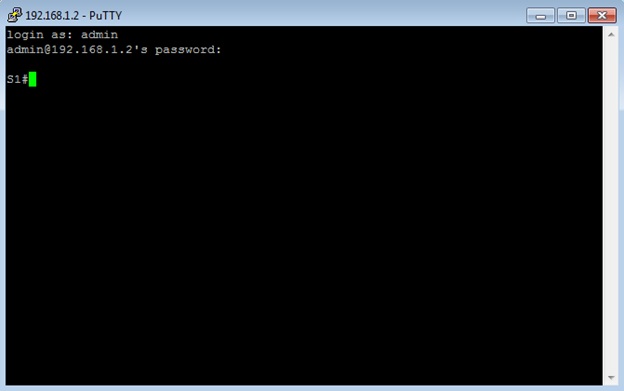
login as: admin
admin@192.168.1.2's password:
S1#show user
Line User Host(s) Idle Location
* 1 vty 0 admin idle 00:00:00 192.168.1.10
Interface User Mode Idle Peer Address
C:\Users\PC-A>telnet 192.168.1.2
Connecting To 192.168.1.2...Could not open connection to the host, on port 23: Connect failed
S1(config)#spanning-tree vlan 1 ?
forward-time Set the forward delay for the spanning tree
hello-time Set the hello interval for the spanning tree
max-age Set the max age interval for the spanning tree
priority Set the bridge priority for the spanning tree
root Configure switch as root
<cr>
S1(config)#spanning-tree vlan 1 priority ?
<0-61440> bridge priority in increments of 4096
S1(config)#spanning-tree vlan 1 priority 0 // FORCE S1 TO BECOME ROOT BRIDGE; DEFAULT IS 32768
S1(config)#do show spanning-tree
VLAN0001
Spanning tree enabled protocol ieee
Root ID Priority 1
Address 0016.c756.6180
This bridge is the root
Hello Time 2 sec Max Age 20 sec Forward Delay 15 sec
Bridge ID Priority 1 (priority 0 sys-id-ext 1)
Address 0016.c756.6180
Hello Time 2 sec Max Age 20 sec Forward Delay 15 sec
Aging Time 300
Interface Role Sts Cost Prio.Nbr Type
------------------- ---- --- --------- -------- --------------------------------
Fa0/1 Desg FWD 19 128.3 P2p // ALL PORTS ON A ROOT BRIDGE ARE FWD STATE
Fa0/5 Desg FWD 19 128.7 P2p
S1(config)#interface fastethernet0/1
S1(config-if)#switchport mode ?
access Set trunking mode to ACCESS unconditionally
dot1q-tunnel set trunking mode to TUNNEL unconditionally
dynamic Set trunking mode to dynamically negotiate access or trunk mode
private-vlan Set private-vlan mode
trunk Set trunking mode to TRUNK unconditionally
S1(config-if)#switchport mode trunk
Command rejected: An interface whose trunk encapsulation is "Auto" can not be configured to "trunk" mode.
S1(config-if)#switchport trunk encapsulation ?
dot1q Interface uses only 802.1q trunking encapsulation when trunking
isl Interface uses only ISL trunking encapsulation when trunking
negotiate Device will negotiate trunking encapsulation with peer on
interface
S1(config-if)#switchport trunk encapsulation dot1q // SET TRUNK ENCAPSULATION ON A C3560
S1(config-if)#switchport mode trunk
S1(config-if)#
*Mar 1 00:16:42.631: %LINEPROTO-5-UPDOWN: Line protocol on Interface FastEthernet0/1, changed state to down
S1(config-if)#
*Mar 1 00:16:45.643: %LINEPROTO-5-UPDOWN: Line protocol on Interface FastEthernet0/1, changed state to up
S1(config-if)#do show interfaces trunk
Port Mode Encapsulation Status Native vlan
Fa0/1 on 802.1q trunking 1 // DEFAULT NATIVE VLAN
Port Vlans allowed on trunk
Fa0/1 1-4094
Port Vlans allowed and active in management domain
Fa0/1 1
Port Vlans in spanning tree forwarding state and not pruned
Fa0/1 1
S1(config)#interface fastethernet0/1
S1(config-if)#switchport trunk ?
allowed Set allowed VLAN characteristics when interface is in trunking
mode
encapsulation Set trunking encapsulation when interface is in trunking mode
native Set trunking native characteristics when interface is in
trunking mode
pruning Set pruning VLAN characteristics when interface is in trunking
mode
S1(config-if)#switchport trunk native ?
vlan Set native VLAN when interface is in trunking mode
S1(config-if)#switchport trunk native vlan ?
<1-4094> VLAN ID of the native VLAN when this port is in trunking mode
S1(config-if)#switchport trunk native vlan 99 // SET NATIVE VLAN TO UNUSED VLAN 99
S1(config-if)#
*Mar 1 00:19:47.667: %CDP-4-NATIVE_VLAN_MISMATCH: Native VLAN mismatch discovered on FastEthernet0/1 (99), with S2.ccnasecurity.com FastEthernet0/1 (1).
S2#
*Mar 1 00:20:00.678: %CDP-4-NATIVE_VLAN_MISMATCH: Native VLAN mismatch discovered on FastEthernet0/1 (1), with S1.ccnasecurity.com FastEthernet0/1 (99).
S2(config)#interface fastethernet0/1
S2(config-if)#switchport trunk native vlan 99
S2(config-if)#do show interfaces trunk
Port Mode Encapsulation Status Native vlan
Fa0/1 auto n-802.1q trunking 99
Port Vlans allowed on trunk
Fa0/1 1-4094
Port Vlans allowed and active in management domain
Fa0/1 1
Port Vlans in spanning tree forwarding state and not pruned
Fa0/1 1
S2(config)#interface fastethernet0/1
S2(config-if)#switchport ?
access Set access mode characteristics of the interface
backup Set backup for the interface
block Disable forwarding of unknown uni/multi cast addresses
host Set port host
mode Set trunking mode of the interface
nonegotiate Device will not engage in negotiation protocol on this
interface
port-security Security related command
priority Set appliance 802.1p priority
private-vlan Set the private VLAN configuration
protected Configure an interface to be a protected port
trunk Set trunking characteristics of the interface
voice Voice appliance attributes
<cr>
S2(config-if)#switchport nonegotiate
Command rejected: Conflict between 'nonegotiate' and 'dynamic' status. // CONFIGURE TRUNKING FIRST
S2(config-if)#switchport trunk encapsulation dot1q
S2(config-if)#switchport mode trunk
S2(config-if)#switchport nonegotiate // DISABLE DTP
S1(config)#interface fastethernet0/1
S1(config-if)#switchport nonegotiate
S1(config-if)#do show interface fastethernet0/1 switchport
Name: Fa0/1
Switchport: Enabled
Administrative Mode: trunk
Operational Mode: trunk
Administrative Trunking Encapsulation: dot1q
Operational Trunking Encapsulation: dot1q
Negotiation of Trunking: Off
Access Mode VLAN: 1 (default)
Trunking Native Mode VLAN: 99 (Inactive)
Administrative Native VLAN tagging: enabled
Voice VLAN: none
Administrative private-vlan host-association: none
Administrative private-vlan mapping: none
Administrative private-vlan trunk native VLAN: none
Administrative private-vlan trunk Native VLAN tagging: enabled
Administrative private-vlan trunk encapsulation: dot1q
Administrative private-vlan trunk normal VLANs: none
Administrative private-vlan trunk associations: none
Administrative private-vlan trunk mappings: none
Operational private-vlan: none
Trunking VLANs Enabled: ALL
Pruning VLANs Enabled: 2-1001
Capture Mode Disabled
Capture VLANs Allowed: ALL
Protected: false
Unknown unicast blocked: disabled
Unknown multicast blocked: disabled
Appliance trust: none
S1(config)#interface fastethernet0/1
S1(config-if)#storm-control ?
action Action to take for storm-control
broadcast Broadcast address storm control
multicast Multicast address storm control
unicast Unicast address storm control
S1(config-if)#storm-control broadcast ?
level Set storm suppression level on this interface
S1(config-if)#storm-control broadcast level ?
<0.00 - 100.00> Enter rising threshold
bps Enter suppression level in bits per second
pps Enter suppression level in packets per second
S1(config-if)#storm-control broadcast level 50 // ENABLE STORM CONTROL FOR BROADCAST
S2(config)#interface fastethernet0/1
S2(config-if)#storm-control broadcast level 50
S2#show run interface fastethernet0/1
Building configuration...
Current configuration : 188 bytes
!
interface FastEthernet0/1
switchport trunk encapsulation dot1q
switchport trunk native vlan 99
switchport mode trunk
switchport nonegotiate
storm-control broadcast level 50.00
end
S1(config)#interface fastethernet0/5 // R1
S1(config-if)#switchport mode access // DISABLE TRUNKING ON ACCESS PORTS
S1(config-if)#interface fastethernet0/6 // PC-A
S1(config-if)#switchport mode access
S1(config-if)#interface fastethernet0/18 // PC-B
S1(config-if)#switchport mode access
S1(config)#interface fastethernet0/5
S1(config-if)#spanning-tree ?
bpdufilter Don't send or receive BPDUs on this interface
bpduguard Don't accept BPDUs on this interface
cost Change an interface's spanning tree port path cost
guard Change an interface's spanning tree guard mode
link-type Specify a link type for spanning tree protocol use
mst Multiple spanning tree
port-priority Change an interface's spanning tree port priority
portfast Enable an interface to move directly to forwarding on link up
stack-port Enable stack port
vlan VLAN Switch Spanning Tree
S1(config-if)#spanning-tree portfast // CONFIGURE PORTFAST ON ACCESS PORTS THAT CONNECT TO A SINGLE PC OR SERVER TO BECOME ACTIVE QUICKLY
%Warning: portfast should only be enabled on ports connected to a single
host. Connecting hubs, concentrators, switches, bridges, etc... to this
interface when portfast is enabled, can cause temporary bridging loops.
Use with CAUTION
%Portfast has been configured on FastEthernet0/5 but will only
have effect when the interface is in a non-trunking mode.
S1(config)#interface fastethernet0/5
S1(config-if)#spanning-tree bpduguard ?
disable Disable BPDU guard for this interface
enable Enable BPDU guard for this interface
S1(config-if)#spanning-tree bpduguard enable // BPDU GUARD PREVENT ROUGE SWITCHES ON ACCESS PORTS
S1(config-if)#interface fastethernet0/6
S1(config-if)#spanning-tree bpduguard enable
S1(config-if)#interface fastethernet0/18
S1(config-if)#spanning-tree bpduguard enable
S1(config)#spanning-tree portfast ?
bpdufilter Enable portfast bdpu filter on this switch
bpduguard Enable portfast bpdu guard on this switch
default Enable portfast by default on all access ports
S1(config)#spanning-tree portfast bpduguard ?
default Enable bdpu guard by default on all portfast ports
S1(config)#spanning-tree portfast bpduguard default // ENABLE PORTFAST AND BPDU GUARD IN GLOBAL CONFIG
S1#show spanning-tree interface fastethernet0/5 detail
Port 7 (FastEthernet0/5) of VLAN0001 is designated forwarding
Port path cost 19, Port priority 128, Port Identifier 128.7.
Designated root has priority 1, address 0016.c756.6180
Designated bridge has priority 1, address 0016.c756.6180
Designated port id is 128.7, designated path cost 0
Timers: message age 0, forward delay 0, hold 0
Number of transitions to forwarding state: 1
The port is in the portfast mode
Link type is point-to-point by default
Bpdu guard is enabled
BPDU: sent 1010, received 0
S2(config)#interface gigabitethernet0/1
S2(config-if)#spanning-tree guard ?
loop Set guard mode to loop guard on interface
none Set guard mode to none
root Set guard mode to root guard on interface
S2(config-if)#spanning-tree guard root // PREVENT ROGUE SWITCH TO BECOME ROOT BRIDGE
S2#show spanning-tree inconsistentports // TO CHECK ANY PORTS RECEIVING SUPERIOR BPDU THAT SHOULDN'T BE
Name Interface Inconsistency
-------------------- ------------------------ ------------------
Number of inconsistent ports (segments) in the system : 0
R1#show interface fastethernet0/1
FastEthernet0/1 is up, line protocol is up
Hardware is Gt96k FE, address is e804.62dc.89ff (bia e804.62dc.89ff)
Internet address is 192.168.1.1/24
MTU 1500 bytes, BW 100000 Kbit/sec, DLY 100 usec,
reliability 255/255, txload 1/255, rxload 1/255
Encapsulation ARPA, loopback not set
Keepalive set (10 sec)
Full-duplex, 100Mb/s, 100BaseTX/FX
ARP type: ARPA, ARP Timeout 04:00:00
Last input 00:00:22, output 00:00:03, output hang never
Last clearing of "show interface" counters never
Input queue: 0/75/0/0 (size/max/drops/flushes); Total output drops: 0
Queueing strategy: fifo
Output queue: 0/40 (size/max)
5 minute input rate 0 bits/sec, 0 packets/sec
5 minute output rate 0 bits/sec, 0 packets/sec
95 packets input, 19241 bytes
Received 95 broadcasts, 0 runts, 0 giants, 0 throttles
0 input errors, 0 CRC, 0 frame, 0 overrun, 0 ignored
0 watchdog
0 input packets with dribble condition detected
296 packets output, 30343 bytes, 0 underruns
0 output errors, 0 collisions, 2 interface resets
53 unknown protocol drops
0 babbles, 0 late collision, 0 deferred
0 lost carrier, 0 no carrier
0 output buffer failures, 0 output buffers swapped out
S1(config)#interface fastethernet0/5
S1(config-if)#switchport port-security // ENABLE PORT SECURITY; MUST BE AN ACCESS PORT; SETS MAXIMUM MAC ADDRESS TO 1 AND VIOLATION TO SHUTDOWN
S1(config-if)#switchport port-security ?
aging Port-security aging commands
mac-address Secure mac address
maximum Max secure addresses
violation Security violation mode
<cr>
S1(config-if)#switchport port-security mac-address ?
H.H.H 48 bit mac address
sticky Configure dynamic secure addresses as sticky
S1(config-if)#switchport port-security mac-address e804.62dc.89ff
Found duplicate mac-address e804.62dc.89ff.
S1(config-if)#shutdown
S1(config-if)#switchport port-security mac-address e804.62dc.89ff // CONFIGURE STATIC MAC ADDRESS OF R1 F0/1 INTERFACE
S1(config-if)#
*Mar 1 00:45:27.639: %LINK-5-CHANGED: Interface FastEthernet0/5, changed state to administratively down
*Mar 1 00:45:28.646: %LINEPROTO-5-UPDOWN: Line protocol on Interface FastEthernet0/5, changed state to down
S1(config-if)#no shutdown
S1(config-if)#
*Mar 1 00:45:38.293: %LINK-3-UPDOWN: Interface FastEthernet0/5, changed state to up
S1(config-if)#
*Mar 1 00:45:39.299: %LINEPROTO-5-UPDOWN: Line protocol on Interface FastEthernet0/5, changed state to up
S1(config-if)#do show port-security ?
% Unrecognized command
S1(config-if)#do show port-security interface fastethernet0/5
Port Security : Enabled
Port Status : Secure-up
Violation Mode : Shutdown
Aging Time : 0 mins
Aging Type : Absolute
SecureStatic Address Aging : Disabled
Maximum MAC Addresses : 1
Total MAC Addresses : 1
Configured MAC Addresses : 1
Sticky MAC Addresses : 0
Last Source Address:Vlan : e804.62dc.89ff:1
Security Violation Count : 0
R1#ping 192.168.1.10 // PC-A
Type escape sequence to abort.
Sending 5, 100-byte ICMP Echos to 192.168.1.10, timeout is 2 seconds:
!!!!!
Success rate is 100 percent (5/5), round-trip min/avg/max = 1/1/4 ms
R1(config)#interface fastethernet0/1
R1(config-if)#shutdown
R1(config-if)#
*Jun 20 02:35:55.511: %LINK-5-CHANGED: Interface FastEthernet0/1, changed state to administratively down
*Jun 20 02:35:56.511: %LINEPROTO-5-UPDOWN: Line protocol on Interface FastEthernet0/1, changed state to down
R1(config-if)#mac-address ?
H.H.H MAC address
R1(config-if)#mac-address aaaa.bbbb.cccc
R1(config-if)#no shutdown
S1#
*Mar 1 00:51:41.729: %LINK-3-UPDOWN: Interface FastEthernet0/5, changed state to up
*Mar 1 00:51:41.754: %PM-4-ERR_DISABLE: psecure-violation error detected on Fa0/5, putting Fa0/5 in err-disable state
S1#
*Mar 1 00:51:41.763: %PORT_SECURITY-2-PSECURE_VIOLATION: Security violation occurred, caused by MAC address aaaa.bbbb.cccc on port FastEthernet0/5.
S1#
*Mar 1 00:51:43.759: %LINK-3-UPDOWN: Interface FastEthernet0/5, changed state to down
S1#show port-security
Secure Port MaxSecureAddr CurrentAddr SecurityViolation Security Action
(Count) (Count) (Count)
---------------------------------------------------------------------------
Fa0/5 1 1 1 Shutdown
---------------------------------------------------------------------------
Total Addresses in System (excluding one mac per port) : 0
Max Addresses limit in System (excluding one mac per port) : 6144
S1#show port-security address
Secure Mac Address Table
------------------------------------------------------------------------
Vlan Mac Address Type Ports Remaining Age
(mins)
---- ----------- ---- ----- -------------
1 e804.62dc.89ff SecureConfigured Fa0/5 -
------------------------------------------------------------------------
Total Addresses in System (excluding one mac per port) : 0
Max Addresses limit in System (excluding one mac per port) : 6144
S1#show port-security interface f0/5
Port Security : Enabled
Port Status : Secure-shutdown
Violation Mode : Shutdown
Aging Time : 0 mins
Aging Type : Absolute
SecureStatic Address Aging : Disabled
Maximum MAC Addresses : 1
Total MAC Addresses : 1
Configured MAC Addresses : 1
Sticky MAC Addresses : 0
Last Source Address:Vlan : aaaa.bbbb.cccc:1
Security Violation Count : 1
R1#ping 192.168.1.10
Type escape sequence to abort.
Sending 5, 100-byte ICMP Echos to 192.168.1.10, timeout is 2 seconds:
.....
Success rate is 0 percent (0/5)
R1(config)#interface fastethernet0/1
R1(config-if)#shutdown
*Jun 20 02:39:44.803: %LINK-5-CHANGED: Interface FastEthernet0/1, changed state to administratively down
R1(config-if)#no mac-address aaaa.bbbb.cccc
R1(config-if)#no shutdown
R1#ping 192.168.1.10 // CAN'T PING PC-A DUE TO ERR-DISABLE PORT ON S1
*Jun 20 02:40:33.915: %SYS-5-CONFIG_I: Configured from console by console
Type escape sequence to abort.
Sending 5, 100-byte ICMP Echos to 192.168.1.10, timeout is 2 seconds:
.....
Success rate is 0 percent (0/5)
S1#show interface fastethernet0/5
FastEthernet0/5 is down, line protocol is down (err-disabled)
Hardware is Fast Ethernet, address is 0016.c756.6187 (bia 0016.c756.6187)
MTU 1500 bytes, BW 10000 Kbit, DLY 1000 usec,
reliability 255/255, txload 1/255, rxload 1/255
Encapsulation ARPA, loopback not set
Keepalive set (10 sec)
Auto-duplex, Auto-speed, media type is 10/100BaseTX
input flow-control is off, output flow-control is unsupported
ARP type: ARPA, ARP Timeout 04:00:00
Last input 00:04:57, output 00:04:57, output hang never
Last clearing of "show interface" counters never
Input queue: 0/75/0/0 (size/max/drops/flushes); Total output drops: 0
Queueing strategy: fifo
Output queue: 0/40 (size/max)
5 minute input rate 0 bits/sec, 0 packets/sec
5 minute output rate 0 bits/sec, 0 packets/sec
374 packets input, 39990 bytes, 0 no buffer
Received 65 broadcasts (60 multicasts)
0 runts, 0 giants, 0 throttles
0 input errors, 0 CRC, 0 frame, 0 overrun, 0 ignored
0 watchdog, 60 multicast, 0 pause input
0 input packets with dribble condition detected
2333 packets output, 186644 bytes, 0 underruns
0 output errors, 0 collisions, 3 interface resets
0 babbles, 0 late collision, 0 deferred
0 lost carrier, 0 no carrier, 0 PAUSE output
0 output buffer failures, 0 output buffers swapped out
S1(config)#interface fastethernet0/5
S1(config-if)#shutdown
S1(config-if)#no shutdown // TO RE-ENABLE ERR-DISABLED PORT; CAN ALSO RE-ENABLE BY REMOVING AND RE-CONFIGURE PORT SECURITY CONFIG; CAN USE default interface GLOBAL CONFIG COMMAND
S1(config-if)#
*Mar 1 00:57:30.301: %LINK-5-CHANGED: Interface FastEthernet0/5, changed state to administratively down
S1(config-if)#
*Mar 1 00:57:32.767: %LINK-3-UPDOWN: Interface FastEthernet0/5, changed state to up
*Mar 1 00:57:33.774: %LINEPROTO-5-UPDOWN: Line protocol on Interface FastEthernet0/5, changed state to up
R1#ping 192.168.1.10
Type escape sequence to abort.
Sending 5, 100-byte ICMP Echos to 192.168.1.10, timeout is 2 seconds:
!!!!!
Success rate is 100 percent (5/5), round-trip min/avg/max = 1/1/4 ms
S1(config)#interface fastethernet0/18 // PORT SECURITY CONFIG FOR VoIP
S1(config-if)#switchport mode access
S1(config-if)#switchport port-security maximum 3 // ALLOW MAC ADDRESS FOR IP PHONE, INTERNAL SWITCH AND PC
S1(config-if)#switchport port-security violation shutdown
S1(config-if)#switchport port-security aging time 120 // AGING SET TO 2 HOURS
S1(config)#interface range fastethernet0/2-4 // DISABLE UNUSED PORTS
S1(config-if-range)#shutdown
S1(config-vlan)#interface range fastethernet0/2-4 // MOVE ACTIVE PORTS OTHER THAN DEFAULT VLAN 1 TO PREVENT END USER HOSTS TO TALK TO MANAGEMENT VLAN IP ADDRESS OF THE SWITCH; CAN DESIGNATE A SWITCH PORT FOR MANAGEMENT AND ADD IT TO VLAN 1
S1(config-if-range)#switchport access vlan 20
S1(config)#interface fastethernet0/6
S1(config-if)#switchport ?
access Set access mode characteristics of the interface
backup Set backup for the interface
block Disable forwarding of unknown uni/multi cast addresses
host Set port host
mode Set trunking mode of the interface
nonegotiate Device will not engage in negotiation protocol on this
interface
port-security Security related command
priority Set appliance 802.1p priority
private-vlan Set the private VLAN configuration
protected Configure an interface to be a protected port
trunk Set trunking characteristics of the interface
voice Voice appliance attributes
<cr>
S1(config-if)#switchport protected // ENABLE PVLAN EDGE FEATURE; DISABLE LAYER 2 TRAFFIC BETWEEN HOSTS ON SAME SWITCH; TO DISABLE USE no switchport protected
S1(config-if)#interface fastethernet0/7
S1(config-if)#switchport protected
S1(config-if)#do show interface fastethernet0/6 switchport
Name: Fa0/6
Switchport: Enabled
Administrative Mode: static access
Operational Mode: static access
Administrative Trunking Encapsulation: negotiate
Operational Trunking Encapsulation: native
Negotiation of Trunking: Off
Access Mode VLAN: 1 (default)
Trunking Native Mode VLAN: 1 (default)
Administrative Native VLAN tagging: enabled
Voice VLAN: none
Administrative private-vlan host-association: none
Administrative private-vlan mapping: none
Administrative private-vlan trunk native VLAN: none
Administrative private-vlan trunk Native VLAN tagging: enabled
Administrative private-vlan trunk encapsulation: dot1q
Administrative private-vlan trunk normal VLANs: none
Administrative private-vlan trunk associations: none
Administrative private-vlan trunk mappings: none
Operational private-vlan: none
Trunking VLANs Enabled: ALL
Pruning VLANs Enabled: 2-1001
Capture Mode Disabled
Capture VLANs Allowed: ALL
Protected: true
Unknown unicast blocked: disabled
Unknown multicast blocked: disabled
Appliance trust: none
S1(config)#monitor ?
event-trace Tracing of system events
session Configure a SPAN session
S1(config)#monitor session ?
<1-66> SPAN session number
S1(config)#monitor session 1 ?
destination SPAN destination interface or VLAN
filter SPAN filter VLAN
source SPAN source interface, VLAN
S1(config)#monitor session 1 source ?
interface SPAN source interface
remote SPAN source Remote
vlan SPAN source VLAN
S1(config)#monitor session 1 source interface f0/5 ?
, Specify another range of interfaces
- Specify a range of interfaces
both Monitor received and transmitted traffic
rx Monitor received traffic only
tx Monitor transmitted traffic only
<cr>
S1(config)#monitor session 1 source interface f0/5 both // CONFIGURE SWITCHED PORT ANALYZER (SPAN) ON BOTH INGRESS AND EGRESS TRAFFIC ON F0/5 INTERFACE
S1(config)#monitor session 1 destination interface f0/6 // SET SPAN DESTINATION INTERFACE WHERE PC-A RUNS WIRESHARK
S1#show monitor ?
detail Detailed SPAN information
event-trace Trace information
session SPAN session
| Output modifiers
<cr>
S1#show monitor session ?
<1-66> SPAN session number
all Show all SPAN sessions
erspan-destination Show only Destination ERSPAN sessions
erspan-source Show only Source ERSPAN sessions
local Show only Local SPAN sessions
range Show a range of SPAN sessions in the box
remote Show only Remote SPAN sessions
S1#show monitor session 1
Session 1
---------
Type : Local Session
Source Ports :
Both : Fa0/5
Destination Ports : Fa0/6
Encapsulation : Native
Ingress : Disabled


S2#ping 192.168.1.1 source 192.168.1.3 // PING R1 F0/1 FROM S2 VLAN 1 IP
Type escape sequence to abort.
Sending 5, 100-byte ICMP Echos to 192.168.1.1, timeout is 2 seconds:
Packet sent with a source address of 192.168.1.3
!!!!!
Success rate is 100 percent (5/5), round-trip min/avg/max = 1/203/1007 ms


Wireshark is a very powerful tool and I only use it when necessary and as a last resort for troubleshooting. It's also a good way of proving that it's not an issue with the network. I've read and highly recommend a book about Wireshark called Practical Packet Analysis by Chris Sanders. Below is the Layer 2 switching security and Wireshark lab I did while studying for my CompTIA Security+.

Switch(config)#hostname S1
S1(config)#no ip domain-lookup
S1(config)#interface vlan1
S1(config-if)#ip address 192.168.1.2 255.255.255.0
S1(config-if)#no shutdown
S1(config-if)#
*Mar 1 00:07:15.788: %LINK-3-UPDOWN: Interface Vlan1, changed state to up
*Mar 1 00:07:16.794: %LINEPROTO-5-UPDOWN: Line protocol on Interface Vlan1, changed state to up
S1(config-if)#enable secret cisco12345
S1(config)#line console 0
S1(config-line)#password ciscoconpass
S1(config-line)#exec-timeout 5 0
S1(config-line)#login
S1(config-line)#logging synchronous
Router(config)#hostname R1
R1(config)#no ip domain-lookup
R1(config)#line vty 0 4
R1(config-line)#password ciscovtypass
R1(config-line)#exec-timeout 5 0
R1(config-line)#login
R1(config)#interface fastethernet0/1
R1(config-if)#ip address 192.168.1.1 255.255.255.0
R1(config-if)#no shutdown
R1(config-if)#
*Jun 7 12:20:05.163: %LINEPROTO-5-UPDOWN: Line protocol on Interface FastEthernet0/1, changed state to up
S1(config)#no ip http server
S1(config)#no ip http secure-server
Switch(config)#hostname S2
S2(config)#no ip domain-lookup
S2(config)#interface vlan1
S2(config-if)#ip address 192.168.1.3 255.255.255.0
S2(config-if)#no shutdown
S2(config-if)#
*Mar 1 00:14:46.222: %LINK-3-UPDOWN: Interface Vlan1, changed state to up
*Mar 1 00:14:47.229: %LINEPROTO-5-UPDOWN: Line protocol on Interface Vlan1, changed state to up
S2(config-if)#exit
S2(config)#enable secret cisco12345
S2(config)#line console 0
S2(config-line)#password ciscoconpass
S2(config-line)#exec-timeout 5 0
S2(config-line)#login
S2(config-line)#logging synchronous
S2(config-line)#exit
S2(config)#no ip http server
S2(config)#no ip http secure-server
C:\Users\PC-A>ipconfig
Windows IP Configuration
Ethernet adapter Local Area Connection:
Connection-specific DNS Suffix . :
Link-local IPv6 Address . . . . . : fe80::4562:9b92:c15f:91ff%10
IPv4 Address. . . . . . . . . . . : 192.168.1.10
Subnet Mask . . . . . . . . . . . : 255.255.255.0
Default Gateway . . . . . . . . . : 192.168.1.1
C:\Users\PC-A>ping 192.168.1.1 // PING TO R1 F0/1
Pinging 192.168.1.1 with 32 bytes of data:
Reply from 192.168.1.1: bytes=32 time=1ms TTL=255
Reply from 192.168.1.1: bytes=32 time=1ms TTL=255
Reply from 192.168.1.1: bytes=32 time=1ms TTL=255
Reply from 192.168.1.1: bytes=32 time<1ms TTL=255
Ping statistics for 192.168.1.1:
Packets: Sent = 4, Received = 4, Lost = 0 (0% loss),
Approximate round trip times in milli-seconds:
Minimum = 0ms, Maximum = 1ms, Average = 0ms
C:\Users\PC-A>ping 192.168.1.11 // PING TO PC-B
Pinging 192.168.1.11 with 32 bytes of data:
Reply from 192.168.1.11: bytes=32 time=2ms TTL=128
Reply from 192.168.1.11: bytes=32 time=1ms TTL=128
Reply from 192.168.1.11: bytes=32 time<1ms TTL=128
Reply from 192.168.1.11: bytes=32 time<1ms TTL=128
Ping statistics for 192.168.1.11:
Packets: Sent = 4, Received = 4, Lost = 0 (0% loss),
Approximate round trip times in milli-seconds:
Minimum = 0ms, Maximum = 2ms, Average = 0ms
C:\Users\PC-B>ipconfig
Windows IP Configuration
Ethernet adapter Local Area Connection:
Connection-specific DNS Suffix . :
Link-local IPv6 Address . . . . . : fe80::9416:ccf3:aa3:6460%11
IPv4 Address. . . . . . . . . . . : 192.168.1.11
Subnet Mask . . . . . . . . . . . : 255.255.255.0
Default Gateway . . . . . . . . . : 192.168.1.1
C:\Users\PC-B>ping 192.168.1.1 // PING TO R1 F0/1
Pinging 192.168.1.1 with 32 bytes of data:
Reply from 192.168.1.1: bytes=32 time=1ms TTL=255
Reply from 192.168.1.1: bytes=32 time=1ms TTL=255
Reply from 192.168.1.1: bytes=32 time=1ms TTL=255
Reply from 192.168.1.1: bytes=32 time=1ms TTL=255
Ping statistics for 192.168.1.1:
Packets: Sent = 4, Received = 4, Lost = 0 (0% loss),
Approximate round trip times in milli-seconds:
Minimum = 1ms, Maximum = 1ms, Average = 1ms
C:\Users\PC-B>ping 192.168.1.10 // PING TO PC-A
Pinging 192.168.1.10 with 32 bytes of data:
Reply from 192.168.1.10: bytes=32 time<1ms TTL=128
Reply from 192.168.1.10: bytes=32 time<1ms TTL=128
Reply from 192.168.1.10: bytes=32 time<1ms TTL=128
Reply from 192.168.1.10: bytes=32 time<1ms TTL=128
Ping statistics for 192.168.1.10:
Packets: Sent = 4, Received = 4, Lost = 0 (0% loss),
Approximate round trip times in milli-seconds:
Minimum = 0ms, Maximum = 0ms, Average = 0ms
S1(config)#ip domain-name ccnasecurity.com
S1(config)#username admin privilege 15 secret cisco12345
S1(config)#end
S1#ex
*Mar 1 00:35:07.201: %SYS-5-CONFIG_I: Configured from console by console
S1#exit
S1 con0 is now available
Press RETURN to get started.
User Access Verification
Password:
S1(config)#line vty 0 4
S1(config-line)#privilege level 15
S1(config-line)#exec-timeout 5 0
S1(config-line)#login local
S1(config-line)#transport input ?
all All protocols
none No protocols
ssh TCP/IP SSH protocol
telnet TCP/IP Telnet protocol
S1(config-line)#transport input ssh
S1(config-line)#line vty 5 15
S1(config-line)#transport input none
S1(config-line)#exit
S1(config)#crypto ?
ca Certification authority
engine Crypto Engine Config Menu
key Long term key operations
pki Public Key components
S1(config)#crypto key ?
decrypt Decrypt a keypair.
encrypt Encrypt a keypair.
export Export keys
generate Generate new keys
import Import keys
pubkey-chain Peer public key chain management
storage default storage location for keypairs
zeroize Remove keys
S1(config)#crypto key generate ?
rsa Generate RSA keys
<cr>
S1(config)#crypto key generate rsa ?
general-keys Generate a general purpose RSA key pair for signing and
encryption
storage Provide a storage location
usage-keys Generate separate RSA key pairs for signing and encryption
<cr>
S1(config)#crypto key generate rsa general-keys ?
exportable Allow the key to be exported
label Provide a label
modulus Provide number of modulus bits on the command line
storage Provide a storage location
<cr>
S1(config)#crypto key generate rsa general-keys modulus ?
<360-2048> size of the key modulus [360-2048]
S1(config)#crypto key generate rsa general-keys modulus 1024 // DEFFAULT 512 BIT RSA KEYS
The name for the keys will be: S1.ccnasecurity.com
% The key modulus size is 1024 bits
% Generating 1024 bit RSA keys, keys will be non-exportable...[OK]
S1(config)#
*Mar 1 00:39:03.256: %SSH-5-ENABLED: SSH 1.99 has been enabled
S1#show ip ssh
SSH Enabled - version 1.99
Authentication timeout: 120 secs; Authentication retries: 3
S1(config)#ip ssh ?
authentication-retries Specify number of authentication retries
dscp IP DSCP value for SSH traffic
logging Configure logging for SSH
precedence IP Precedence value for SSH traffic
source-interface Specify interface for source address in SSH
connections
time-out Specify SSH time-out interval
version Specify protocol version supported
S1(config)#ip ssh time-out ?
<1-120> SSH time-out interval (secs)
S1(config)#ip ssh time-out 90
S1(config)#ip ssh authentication-retries ?
<0-5> Number of authentication retries
S1(config)#ip ssh authentication-retries 2
S1(config)#do show ip ssh
SSH Enabled - version 1.99
Authentication timeout: 90 secs; Authentication retries: 2

S2(config)#ip domain-name ccnasecurity.com
S2(config)#username admin privilege 15 secret cisco12345
S2(config)#line vty 0 4
S2(config-line)#privilege level 15
S2(config-line)#exec-timeout 5 0
S2(config-line)#login local
S2(config-line)#transport input ssh
S2(config-line)#line vty 5 15
S2(config-line)#transport input none
S2(config-line)#exit
S2(config)#crypto key generate rsa general-keys modulus 1024
The name for the keys will be: S2.ccnasecurity.com
% The key modulus size is 1024 bits
% Generating 1024 bit RSA keys, keys will be non-exportable...[OK]
S2(config)#
*Mar 1 00:46:27.173: %SSH-5-ENABLED: SSH 1.99 has been enabled
S2(config)#ip ssh time-out 90
S2(config)#ip ssh authentication-retries 2
S2(config)#do show ip ssh
SSH Enabled - version 1.99
Authentication timeout: 90 secs; Authentication retries: 2
login as: admin
admin@192.168.1.2's password:
S1#show user
Line User Host(s) Idle Location
* 1 vty 0 admin idle 00:00:00 192.168.1.10
Interface User Mode Idle Peer Address
C:\Users\PC-A>telnet 192.168.1.2
Connecting To 192.168.1.2...Could not open connection to the host, on port 23: Connect failed
S1(config)#spanning-tree vlan 1 ?
forward-time Set the forward delay for the spanning tree
hello-time Set the hello interval for the spanning tree
max-age Set the max age interval for the spanning tree
priority Set the bridge priority for the spanning tree
root Configure switch as root
<cr>
S1(config)#spanning-tree vlan 1 priority ?
<0-61440> bridge priority in increments of 4096
S1(config)#spanning-tree vlan 1 priority 0 // FORCE S1 TO BECOME ROOT BRIDGE; DEFAULT IS 32768
S1(config)#do show spanning-tree
VLAN0001
Spanning tree enabled protocol ieee
Root ID Priority 1
Address 0016.c756.6180
This bridge is the root
Hello Time 2 sec Max Age 20 sec Forward Delay 15 sec
Bridge ID Priority 1 (priority 0 sys-id-ext 1)
Address 0016.c756.6180
Hello Time 2 sec Max Age 20 sec Forward Delay 15 sec
Aging Time 300
Interface Role Sts Cost Prio.Nbr Type
------------------- ---- --- --------- -------- --------------------------------
Fa0/1 Desg FWD 19 128.3 P2p // ALL PORTS ON A ROOT BRIDGE ARE FWD STATE
Fa0/5 Desg FWD 19 128.7 P2p
S1(config)#interface fastethernet0/1
S1(config-if)#switchport mode ?
access Set trunking mode to ACCESS unconditionally
dot1q-tunnel set trunking mode to TUNNEL unconditionally
dynamic Set trunking mode to dynamically negotiate access or trunk mode
private-vlan Set private-vlan mode
trunk Set trunking mode to TRUNK unconditionally
S1(config-if)#switchport mode trunk
Command rejected: An interface whose trunk encapsulation is "Auto" can not be configured to "trunk" mode.
S1(config-if)#switchport trunk encapsulation ?
dot1q Interface uses only 802.1q trunking encapsulation when trunking
isl Interface uses only ISL trunking encapsulation when trunking
negotiate Device will negotiate trunking encapsulation with peer on
interface
S1(config-if)#switchport trunk encapsulation dot1q // SET TRUNK ENCAPSULATION ON A C3560
S1(config-if)#switchport mode trunk
S1(config-if)#
*Mar 1 00:16:42.631: %LINEPROTO-5-UPDOWN: Line protocol on Interface FastEthernet0/1, changed state to down
S1(config-if)#
*Mar 1 00:16:45.643: %LINEPROTO-5-UPDOWN: Line protocol on Interface FastEthernet0/1, changed state to up
S1(config-if)#do show interfaces trunk
Port Mode Encapsulation Status Native vlan
Fa0/1 on 802.1q trunking 1 // DEFAULT NATIVE VLAN
Port Vlans allowed on trunk
Fa0/1 1-4094
Port Vlans allowed and active in management domain
Fa0/1 1
Port Vlans in spanning tree forwarding state and not pruned
Fa0/1 1
S1(config)#interface fastethernet0/1
S1(config-if)#switchport trunk ?
allowed Set allowed VLAN characteristics when interface is in trunking
mode
encapsulation Set trunking encapsulation when interface is in trunking mode
native Set trunking native characteristics when interface is in
trunking mode
pruning Set pruning VLAN characteristics when interface is in trunking
mode
S1(config-if)#switchport trunk native ?
vlan Set native VLAN when interface is in trunking mode
S1(config-if)#switchport trunk native vlan ?
<1-4094> VLAN ID of the native VLAN when this port is in trunking mode
S1(config-if)#switchport trunk native vlan 99 // SET NATIVE VLAN TO UNUSED VLAN 99
S1(config-if)#
*Mar 1 00:19:47.667: %CDP-4-NATIVE_VLAN_MISMATCH: Native VLAN mismatch discovered on FastEthernet0/1 (99), with S2.ccnasecurity.com FastEthernet0/1 (1).
S2#
*Mar 1 00:20:00.678: %CDP-4-NATIVE_VLAN_MISMATCH: Native VLAN mismatch discovered on FastEthernet0/1 (1), with S1.ccnasecurity.com FastEthernet0/1 (99).
S2(config)#interface fastethernet0/1
S2(config-if)#switchport trunk native vlan 99
S2(config-if)#do show interfaces trunk
Port Mode Encapsulation Status Native vlan
Fa0/1 auto n-802.1q trunking 99
Port Vlans allowed on trunk
Fa0/1 1-4094
Port Vlans allowed and active in management domain
Fa0/1 1
Port Vlans in spanning tree forwarding state and not pruned
Fa0/1 1
S2(config)#interface fastethernet0/1
S2(config-if)#switchport ?
access Set access mode characteristics of the interface
backup Set backup for the interface
block Disable forwarding of unknown uni/multi cast addresses
host Set port host
mode Set trunking mode of the interface
nonegotiate Device will not engage in negotiation protocol on this
interface
port-security Security related command
priority Set appliance 802.1p priority
private-vlan Set the private VLAN configuration
protected Configure an interface to be a protected port
trunk Set trunking characteristics of the interface
voice Voice appliance attributes
<cr>
S2(config-if)#switchport nonegotiate
Command rejected: Conflict between 'nonegotiate' and 'dynamic' status. // CONFIGURE TRUNKING FIRST
S2(config-if)#switchport trunk encapsulation dot1q
S2(config-if)#switchport mode trunk
S2(config-if)#switchport nonegotiate // DISABLE DTP
S1(config)#interface fastethernet0/1
S1(config-if)#switchport nonegotiate
S1(config-if)#do show interface fastethernet0/1 switchport
Name: Fa0/1
Switchport: Enabled
Administrative Mode: trunk
Operational Mode: trunk
Administrative Trunking Encapsulation: dot1q
Operational Trunking Encapsulation: dot1q
Negotiation of Trunking: Off
Access Mode VLAN: 1 (default)
Trunking Native Mode VLAN: 99 (Inactive)
Administrative Native VLAN tagging: enabled
Voice VLAN: none
Administrative private-vlan host-association: none
Administrative private-vlan mapping: none
Administrative private-vlan trunk native VLAN: none
Administrative private-vlan trunk Native VLAN tagging: enabled
Administrative private-vlan trunk encapsulation: dot1q
Administrative private-vlan trunk normal VLANs: none
Administrative private-vlan trunk associations: none
Administrative private-vlan trunk mappings: none
Operational private-vlan: none
Trunking VLANs Enabled: ALL
Pruning VLANs Enabled: 2-1001
Capture Mode Disabled
Capture VLANs Allowed: ALL
Protected: false
Unknown unicast blocked: disabled
Unknown multicast blocked: disabled
Appliance trust: none
S1(config)#interface fastethernet0/1
S1(config-if)#storm-control ?
action Action to take for storm-control
broadcast Broadcast address storm control
multicast Multicast address storm control
unicast Unicast address storm control
S1(config-if)#storm-control broadcast ?
level Set storm suppression level on this interface
S1(config-if)#storm-control broadcast level ?
<0.00 - 100.00> Enter rising threshold
bps Enter suppression level in bits per second
pps Enter suppression level in packets per second
S1(config-if)#storm-control broadcast level 50 // ENABLE STORM CONTROL FOR BROADCAST
S2(config)#interface fastethernet0/1
S2(config-if)#storm-control broadcast level 50
S2#show run interface fastethernet0/1
Building configuration...
Current configuration : 188 bytes
!
interface FastEthernet0/1
switchport trunk encapsulation dot1q
switchport trunk native vlan 99
switchport mode trunk
switchport nonegotiate
storm-control broadcast level 50.00
end
S1(config)#interface fastethernet0/5 // R1
S1(config-if)#switchport mode access // DISABLE TRUNKING ON ACCESS PORTS
S1(config-if)#interface fastethernet0/6 // PC-A
S1(config-if)#switchport mode access
S1(config-if)#interface fastethernet0/18 // PC-B
S1(config-if)#switchport mode access
S1(config)#interface fastethernet0/5
S1(config-if)#spanning-tree ?
bpdufilter Don't send or receive BPDUs on this interface
bpduguard Don't accept BPDUs on this interface
cost Change an interface's spanning tree port path cost
guard Change an interface's spanning tree guard mode
link-type Specify a link type for spanning tree protocol use
mst Multiple spanning tree
port-priority Change an interface's spanning tree port priority
portfast Enable an interface to move directly to forwarding on link up
stack-port Enable stack port
vlan VLAN Switch Spanning Tree
S1(config-if)#spanning-tree portfast // CONFIGURE PORTFAST ON ACCESS PORTS THAT CONNECT TO A SINGLE PC OR SERVER TO BECOME ACTIVE QUICKLY
%Warning: portfast should only be enabled on ports connected to a single
host. Connecting hubs, concentrators, switches, bridges, etc... to this
interface when portfast is enabled, can cause temporary bridging loops.
Use with CAUTION
%Portfast has been configured on FastEthernet0/5 but will only
have effect when the interface is in a non-trunking mode.
S1(config)#interface fastethernet0/5
S1(config-if)#spanning-tree bpduguard ?
disable Disable BPDU guard for this interface
enable Enable BPDU guard for this interface
S1(config-if)#spanning-tree bpduguard enable // BPDU GUARD PREVENT ROUGE SWITCHES ON ACCESS PORTS
S1(config-if)#interface fastethernet0/6
S1(config-if)#spanning-tree bpduguard enable
S1(config-if)#interface fastethernet0/18
S1(config-if)#spanning-tree bpduguard enable
S1(config)#spanning-tree portfast ?
bpdufilter Enable portfast bdpu filter on this switch
bpduguard Enable portfast bpdu guard on this switch
default Enable portfast by default on all access ports
S1(config)#spanning-tree portfast bpduguard ?
default Enable bdpu guard by default on all portfast ports
S1(config)#spanning-tree portfast bpduguard default // ENABLE PORTFAST AND BPDU GUARD IN GLOBAL CONFIG
S1#show spanning-tree interface fastethernet0/5 detail
Port 7 (FastEthernet0/5) of VLAN0001 is designated forwarding
Port path cost 19, Port priority 128, Port Identifier 128.7.
Designated root has priority 1, address 0016.c756.6180
Designated bridge has priority 1, address 0016.c756.6180
Designated port id is 128.7, designated path cost 0
Timers: message age 0, forward delay 0, hold 0
Number of transitions to forwarding state: 1
The port is in the portfast mode
Link type is point-to-point by default
Bpdu guard is enabled
BPDU: sent 1010, received 0
S2(config)#interface gigabitethernet0/1
S2(config-if)#spanning-tree guard ?
loop Set guard mode to loop guard on interface
none Set guard mode to none
root Set guard mode to root guard on interface
S2(config-if)#spanning-tree guard root // PREVENT ROGUE SWITCH TO BECOME ROOT BRIDGE
S2#show spanning-tree inconsistentports // TO CHECK ANY PORTS RECEIVING SUPERIOR BPDU THAT SHOULDN'T BE
Name Interface Inconsistency
-------------------- ------------------------ ------------------
Number of inconsistent ports (segments) in the system : 0
R1#show interface fastethernet0/1
FastEthernet0/1 is up, line protocol is up
Hardware is Gt96k FE, address is e804.62dc.89ff (bia e804.62dc.89ff)
Internet address is 192.168.1.1/24
MTU 1500 bytes, BW 100000 Kbit/sec, DLY 100 usec,
reliability 255/255, txload 1/255, rxload 1/255
Encapsulation ARPA, loopback not set
Keepalive set (10 sec)
Full-duplex, 100Mb/s, 100BaseTX/FX
ARP type: ARPA, ARP Timeout 04:00:00
Last input 00:00:22, output 00:00:03, output hang never
Last clearing of "show interface" counters never
Input queue: 0/75/0/0 (size/max/drops/flushes); Total output drops: 0
Queueing strategy: fifo
Output queue: 0/40 (size/max)
5 minute input rate 0 bits/sec, 0 packets/sec
5 minute output rate 0 bits/sec, 0 packets/sec
95 packets input, 19241 bytes
Received 95 broadcasts, 0 runts, 0 giants, 0 throttles
0 input errors, 0 CRC, 0 frame, 0 overrun, 0 ignored
0 watchdog
0 input packets with dribble condition detected
296 packets output, 30343 bytes, 0 underruns
0 output errors, 0 collisions, 2 interface resets
53 unknown protocol drops
0 babbles, 0 late collision, 0 deferred
0 lost carrier, 0 no carrier
0 output buffer failures, 0 output buffers swapped out
S1(config)#interface fastethernet0/5
S1(config-if)#switchport port-security // ENABLE PORT SECURITY; MUST BE AN ACCESS PORT; SETS MAXIMUM MAC ADDRESS TO 1 AND VIOLATION TO SHUTDOWN
S1(config-if)#switchport port-security ?
aging Port-security aging commands
mac-address Secure mac address
maximum Max secure addresses
violation Security violation mode
<cr>
S1(config-if)#switchport port-security mac-address ?
H.H.H 48 bit mac address
sticky Configure dynamic secure addresses as sticky
S1(config-if)#switchport port-security mac-address e804.62dc.89ff
Found duplicate mac-address e804.62dc.89ff.
S1(config-if)#shutdown
S1(config-if)#switchport port-security mac-address e804.62dc.89ff // CONFIGURE STATIC MAC ADDRESS OF R1 F0/1 INTERFACE
S1(config-if)#
*Mar 1 00:45:27.639: %LINK-5-CHANGED: Interface FastEthernet0/5, changed state to administratively down
*Mar 1 00:45:28.646: %LINEPROTO-5-UPDOWN: Line protocol on Interface FastEthernet0/5, changed state to down
S1(config-if)#no shutdown
S1(config-if)#
*Mar 1 00:45:38.293: %LINK-3-UPDOWN: Interface FastEthernet0/5, changed state to up
S1(config-if)#
*Mar 1 00:45:39.299: %LINEPROTO-5-UPDOWN: Line protocol on Interface FastEthernet0/5, changed state to up
S1(config-if)#do show port-security ?
% Unrecognized command
S1(config-if)#do show port-security interface fastethernet0/5
Port Security : Enabled
Port Status : Secure-up
Violation Mode : Shutdown
Aging Time : 0 mins
Aging Type : Absolute
SecureStatic Address Aging : Disabled
Maximum MAC Addresses : 1
Total MAC Addresses : 1
Configured MAC Addresses : 1
Sticky MAC Addresses : 0
Last Source Address:Vlan : e804.62dc.89ff:1
Security Violation Count : 0
R1#ping 192.168.1.10 // PC-A
Type escape sequence to abort.
Sending 5, 100-byte ICMP Echos to 192.168.1.10, timeout is 2 seconds:
!!!!!
Success rate is 100 percent (5/5), round-trip min/avg/max = 1/1/4 ms
R1(config)#interface fastethernet0/1
R1(config-if)#shutdown
R1(config-if)#
*Jun 20 02:35:55.511: %LINK-5-CHANGED: Interface FastEthernet0/1, changed state to administratively down
*Jun 20 02:35:56.511: %LINEPROTO-5-UPDOWN: Line protocol on Interface FastEthernet0/1, changed state to down
R1(config-if)#mac-address ?
H.H.H MAC address
R1(config-if)#mac-address aaaa.bbbb.cccc
R1(config-if)#no shutdown
S1#
*Mar 1 00:51:41.729: %LINK-3-UPDOWN: Interface FastEthernet0/5, changed state to up
*Mar 1 00:51:41.754: %PM-4-ERR_DISABLE: psecure-violation error detected on Fa0/5, putting Fa0/5 in err-disable state
S1#
*Mar 1 00:51:41.763: %PORT_SECURITY-2-PSECURE_VIOLATION: Security violation occurred, caused by MAC address aaaa.bbbb.cccc on port FastEthernet0/5.
S1#
*Mar 1 00:51:43.759: %LINK-3-UPDOWN: Interface FastEthernet0/5, changed state to down
S1#show port-security
Secure Port MaxSecureAddr CurrentAddr SecurityViolation Security Action
(Count) (Count) (Count)
---------------------------------------------------------------------------
Fa0/5 1 1 1 Shutdown
---------------------------------------------------------------------------
Total Addresses in System (excluding one mac per port) : 0
Max Addresses limit in System (excluding one mac per port) : 6144
S1#show port-security address
Secure Mac Address Table
------------------------------------------------------------------------
Vlan Mac Address Type Ports Remaining Age
(mins)
---- ----------- ---- ----- -------------
1 e804.62dc.89ff SecureConfigured Fa0/5 -
------------------------------------------------------------------------
Total Addresses in System (excluding one mac per port) : 0
Max Addresses limit in System (excluding one mac per port) : 6144
S1#show port-security interface f0/5
Port Security : Enabled
Port Status : Secure-shutdown
Violation Mode : Shutdown
Aging Time : 0 mins
Aging Type : Absolute
SecureStatic Address Aging : Disabled
Maximum MAC Addresses : 1
Total MAC Addresses : 1
Configured MAC Addresses : 1
Sticky MAC Addresses : 0
Last Source Address:Vlan : aaaa.bbbb.cccc:1
Security Violation Count : 1
R1#ping 192.168.1.10
Type escape sequence to abort.
Sending 5, 100-byte ICMP Echos to 192.168.1.10, timeout is 2 seconds:
.....
Success rate is 0 percent (0/5)
R1(config)#interface fastethernet0/1
R1(config-if)#shutdown
*Jun 20 02:39:44.803: %LINK-5-CHANGED: Interface FastEthernet0/1, changed state to administratively down
R1(config-if)#no mac-address aaaa.bbbb.cccc
R1(config-if)#no shutdown
R1#ping 192.168.1.10 // CAN'T PING PC-A DUE TO ERR-DISABLE PORT ON S1
*Jun 20 02:40:33.915: %SYS-5-CONFIG_I: Configured from console by console
Type escape sequence to abort.
Sending 5, 100-byte ICMP Echos to 192.168.1.10, timeout is 2 seconds:
.....
Success rate is 0 percent (0/5)
S1#show interface fastethernet0/5
FastEthernet0/5 is down, line protocol is down (err-disabled)
Hardware is Fast Ethernet, address is 0016.c756.6187 (bia 0016.c756.6187)
MTU 1500 bytes, BW 10000 Kbit, DLY 1000 usec,
reliability 255/255, txload 1/255, rxload 1/255
Encapsulation ARPA, loopback not set
Keepalive set (10 sec)
Auto-duplex, Auto-speed, media type is 10/100BaseTX
input flow-control is off, output flow-control is unsupported
ARP type: ARPA, ARP Timeout 04:00:00
Last input 00:04:57, output 00:04:57, output hang never
Last clearing of "show interface" counters never
Input queue: 0/75/0/0 (size/max/drops/flushes); Total output drops: 0
Queueing strategy: fifo
Output queue: 0/40 (size/max)
5 minute input rate 0 bits/sec, 0 packets/sec
5 minute output rate 0 bits/sec, 0 packets/sec
374 packets input, 39990 bytes, 0 no buffer
Received 65 broadcasts (60 multicasts)
0 runts, 0 giants, 0 throttles
0 input errors, 0 CRC, 0 frame, 0 overrun, 0 ignored
0 watchdog, 60 multicast, 0 pause input
0 input packets with dribble condition detected
2333 packets output, 186644 bytes, 0 underruns
0 output errors, 0 collisions, 3 interface resets
0 babbles, 0 late collision, 0 deferred
0 lost carrier, 0 no carrier, 0 PAUSE output
0 output buffer failures, 0 output buffers swapped out
S1(config)#interface fastethernet0/5
S1(config-if)#shutdown
S1(config-if)#no shutdown // TO RE-ENABLE ERR-DISABLED PORT; CAN ALSO RE-ENABLE BY REMOVING AND RE-CONFIGURE PORT SECURITY CONFIG; CAN USE default interface GLOBAL CONFIG COMMAND
S1(config-if)#
*Mar 1 00:57:30.301: %LINK-5-CHANGED: Interface FastEthernet0/5, changed state to administratively down
S1(config-if)#
*Mar 1 00:57:32.767: %LINK-3-UPDOWN: Interface FastEthernet0/5, changed state to up
*Mar 1 00:57:33.774: %LINEPROTO-5-UPDOWN: Line protocol on Interface FastEthernet0/5, changed state to up
R1#ping 192.168.1.10
Type escape sequence to abort.
Sending 5, 100-byte ICMP Echos to 192.168.1.10, timeout is 2 seconds:
!!!!!
Success rate is 100 percent (5/5), round-trip min/avg/max = 1/1/4 ms
S1(config)#interface fastethernet0/18 // PORT SECURITY CONFIG FOR VoIP
S1(config-if)#switchport mode access
S1(config-if)#switchport port-security maximum 3 // ALLOW MAC ADDRESS FOR IP PHONE, INTERNAL SWITCH AND PC
S1(config-if)#switchport port-security violation shutdown
S1(config-if)#switchport port-security aging time 120 // AGING SET TO 2 HOURS
S1(config)#interface range fastethernet0/2-4 // DISABLE UNUSED PORTS
S1(config-if-range)#shutdown
S1(config-vlan)#interface range fastethernet0/2-4 // MOVE ACTIVE PORTS OTHER THAN DEFAULT VLAN 1 TO PREVENT END USER HOSTS TO TALK TO MANAGEMENT VLAN IP ADDRESS OF THE SWITCH; CAN DESIGNATE A SWITCH PORT FOR MANAGEMENT AND ADD IT TO VLAN 1
S1(config-if-range)#switchport access vlan 20
S1(config)#interface fastethernet0/6
S1(config-if)#switchport ?
access Set access mode characteristics of the interface
backup Set backup for the interface
block Disable forwarding of unknown uni/multi cast addresses
host Set port host
mode Set trunking mode of the interface
nonegotiate Device will not engage in negotiation protocol on this
interface
port-security Security related command
priority Set appliance 802.1p priority
private-vlan Set the private VLAN configuration
protected Configure an interface to be a protected port
trunk Set trunking characteristics of the interface
voice Voice appliance attributes
<cr>
S1(config-if)#switchport protected // ENABLE PVLAN EDGE FEATURE; DISABLE LAYER 2 TRAFFIC BETWEEN HOSTS ON SAME SWITCH; TO DISABLE USE no switchport protected
S1(config-if)#interface fastethernet0/7
S1(config-if)#switchport protected
S1(config-if)#do show interface fastethernet0/6 switchport
Name: Fa0/6
Switchport: Enabled
Administrative Mode: static access
Operational Mode: static access
Administrative Trunking Encapsulation: negotiate
Operational Trunking Encapsulation: native
Negotiation of Trunking: Off
Access Mode VLAN: 1 (default)
Trunking Native Mode VLAN: 1 (default)
Administrative Native VLAN tagging: enabled
Voice VLAN: none
Administrative private-vlan host-association: none
Administrative private-vlan mapping: none
Administrative private-vlan trunk native VLAN: none
Administrative private-vlan trunk Native VLAN tagging: enabled
Administrative private-vlan trunk encapsulation: dot1q
Administrative private-vlan trunk normal VLANs: none
Administrative private-vlan trunk associations: none
Administrative private-vlan trunk mappings: none
Operational private-vlan: none
Trunking VLANs Enabled: ALL
Pruning VLANs Enabled: 2-1001
Capture Mode Disabled
Capture VLANs Allowed: ALL
Protected: true
Unknown unicast blocked: disabled
Unknown multicast blocked: disabled
Appliance trust: none
S1(config)#monitor ?
event-trace Tracing of system events
session Configure a SPAN session
S1(config)#monitor session ?
<1-66> SPAN session number
S1(config)#monitor session 1 ?
destination SPAN destination interface or VLAN
filter SPAN filter VLAN
source SPAN source interface, VLAN
S1(config)#monitor session 1 source ?
interface SPAN source interface
remote SPAN source Remote
vlan SPAN source VLAN
S1(config)#monitor session 1 source interface f0/5 ?
, Specify another range of interfaces
- Specify a range of interfaces
both Monitor received and transmitted traffic
rx Monitor received traffic only
tx Monitor transmitted traffic only
<cr>
S1(config)#monitor session 1 source interface f0/5 both // CONFIGURE SWITCHED PORT ANALYZER (SPAN) ON BOTH INGRESS AND EGRESS TRAFFIC ON F0/5 INTERFACE
S1(config)#monitor session 1 destination interface f0/6 // SET SPAN DESTINATION INTERFACE WHERE PC-A RUNS WIRESHARK
S1#show monitor ?
detail Detailed SPAN information
event-trace Trace information
session SPAN session
| Output modifiers
<cr>
S1#show monitor session ?
<1-66> SPAN session number
all Show all SPAN sessions
erspan-destination Show only Destination ERSPAN sessions
erspan-source Show only Source ERSPAN sessions
local Show only Local SPAN sessions
range Show a range of SPAN sessions in the box
remote Show only Remote SPAN sessions
S1#show monitor session 1
Session 1
---------
Type : Local Session
Source Ports :
Both : Fa0/5
Destination Ports : Fa0/6
Encapsulation : Native
Ingress : Disabled


S2#ping 192.168.1.1 source 192.168.1.3 // PING R1 F0/1 FROM S2 VLAN 1 IP
Type escape sequence to abort.
Sending 5, 100-byte ICMP Echos to 192.168.1.1, timeout is 2 seconds:
Packet sent with a source address of 192.168.1.3
!!!!!
Success rate is 100 percent (5/5), round-trip min/avg/max = 1/203/1007 ms


