Friday, September 14, 2018

Cisco Commerce Workspace (CCW)

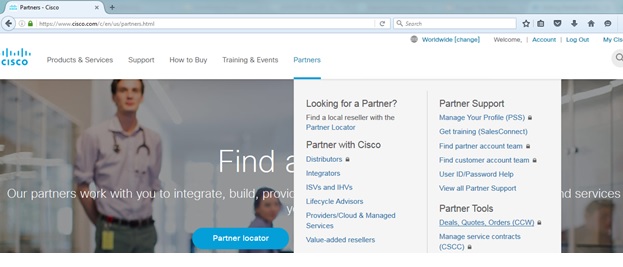
There's an online tool called Cisco Commerce Workspace (CCW) which quickly gives an estimate price (in US Dollars) on various Cisco products. This would aid Cisco reseller, IT and Project Managers create quotes and build their Bill of Materials (BOM). You can access the CCW tool by going to Cisco.com > Partners > Partner Tools > Deals, Quotes, Orders (CCW). A CCO login is required and here's a useful user guide for this tool.


Type under Search for Product or SKU (in this case ASA5525)


Click + to add item.

The main difference between a K8 and K9 device is the encryption license support. The K8 bundle supports a "weak" or base encryption license (DES) swhile K9 bundle supports a stronger encryption license (3DES/AES).


Clicked + on ASA5525-K9 and the selected item will appear on the right.


Click + on L-ASA-SC-5= (5 Security Context License) then click Add on the right in order to check out and CCW will give an estimated total price.


To perform a search again, click Find Products & Solutions.


To remove an item, click under a specific item > More Actions > Remove Line.


Sunday, September 2, 2018

Removing AAA on a Cisco ASA Security Context

I had to migrate TACACS+ from ACS to ISE and also needed to clean up AAA on each security context that were still pointed to ACS. You'll need to negate each AAA configuration lines before executing the clear configure aaa-server.


ciscoasa/CUST-A# show run aaa
aaa authentication http console ACS LOCAL
aaa authentication ssh console ACS LOCAL
aaa authentication telnet console ACS LOCAL
aaa authentication enable console ACS LOCAL
aaa authorization command ACS LOCAL
aaa authentication login-history
ciscoasa/CUST-A#          
ciscoasa/CUST-A# show run aaa-server
aaa-server ACS protocol tacacs+
aaa-server ACS (MGMT) host ACS01
 key *****
aaa-server ACS (MGMT) host ACS02
 key *****
ciscoasa/CUST-A# configure terminal
ciscoasa/CUST-A(config)# clear config a?


configure mode commands/options:

  aaa            aaa-server                access-group    access-list

  all            anyconnect-custom-data    arp             arp-inspection

  as-path        asdm                      asp             auth-prompt

  auto-update 

configure mode commands/options:
  WORD  Enter the name of the aaa-server group
  <cr>
 
ciscoasa/CUST-A(config)# clear configure aaa-server
ERROR: aaa-server group <ACS> is in use by the aaa subsystem. Please remove the relevant configuration before removing the aaa-server group.
 
 
Remove AAA config first with the quick and easy clear config aaa global config command:
 

ciscoasa/CUST-A(config)# clear config aaa ?


configure mode commands/options:

  <cr>

ciscoasa/CUST-A(config)# clear config aaa

ciscoasa/CUST-A(config)#

ciscoasa/CUST-A(config)# clear config aaa-server

ciscoasa/CUST-A(config)# end


ciscoasa/CUST-A# show run aaa-server     

ciscoasa/CUST-A#

ciscoasa/CUST-Ax# show run aaa      

aaa authentication login-history

ciscoasa/CUST-A#


I wasn't locked out after applying these commands inside the ASA context.